The admin console
A tour of the bundled Angular console: sign in, watch the dashboard, browse and edit buckets, search across everything, and manage keys, users, backups, replication, integrity, and the audit log.
Open it
The console is served from the object store itself, under your mount path:
Standalone:  http://localhost:9000/admin
Embedded:    http://<host><mountPath>/admin     (e.g. /storage/admin)
Sign in at /login with your admin username and password (ADMIN_USERNAME defaults to admin). Everything past login is behind an auth guard; the only routes outside the app shell are /login and /force-rotate (shown when a password rotation is required). All feature screens are lazy-loaded, so the first paint is fast.
The SPA is wired only when you configure the admin block (with serveUi: true) — a headless, S3-only store has no console. See the module reference.
The Dashboard
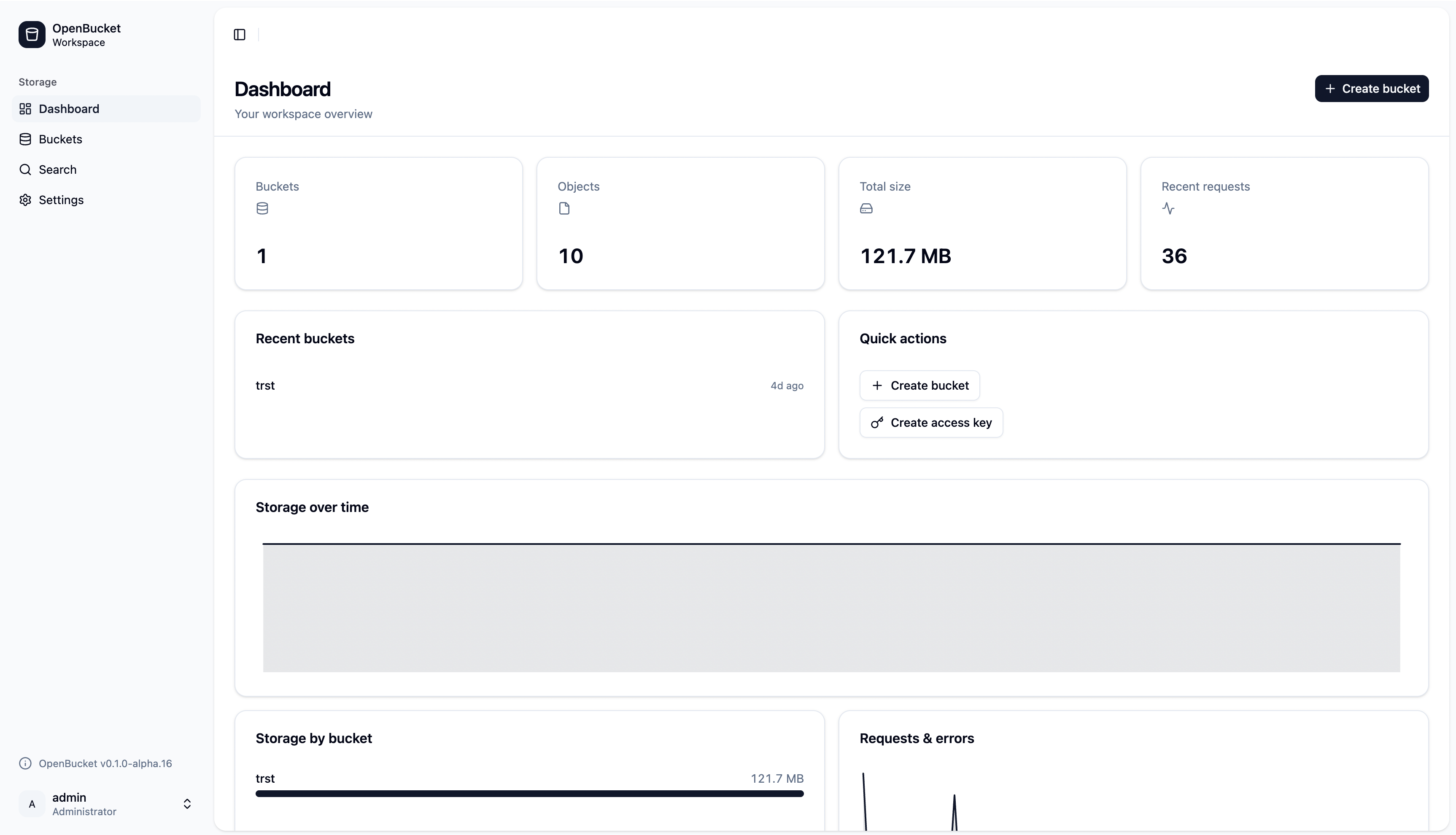
The landing page (/) is an at-a-glance overview: total buckets, objects, and stored bytes, your most recent buckets, and quick actions. Below that are usage-analytics charts — storage over time, a per-bucket size breakdown, and request / error rates — driven by a background rollup. The dashboard polls on a bounded interval and pauses while the tab is hidden, so it stays live without hammering the server.
Buckets & the object browser
Buckets (/buckets) lists every bucket with its object count, size, versioning, and lock status. Open one to reach the bucket detail page (/buckets/:name), a tabbed editor for that bucket:
- Objects — jump into the browser.
- Properties — core bucket facts.
- Versioning — enable or suspend object versioning.
- Encryption — toggle SSE-S3 at-rest encryption.
- Object Lock — governance/compliance retention and legal hold.
- Tags — bucket-level tag set.
- Lifecycle — expiration and transition (tiering) rules.
- CORS — the cross-origin rule editor.
- Policy — the bucket policy (JSON) editor.
Browsing objects
The object browser (/buckets/:name/browse) lists a bucket with a / delimiter, so shared prefixes surface as folders you can walk into. From here you can:
- Upload files (drag-and-drop or picker) and download them back.
- Preview an object inline — images, PDFs, text/code, video, and audio — rendered in a sandboxed frame (CSP-locked, with per-kind size caps).
- Delete objects; on a versioned bucket you can inspect versions and delete markers.
- Share an object with a presigned link that expires.
Rows are keyboard-operable, so you can drive the whole browser without a mouse.
Search
Search (/search) is a cross-bucket object finder. Pick a mode — prefix or contains — optionally filter by bucket and tag, and it queries every bucket at once. The query box is debounced (300 ms) so keystrokes don't hammer the endpoint, and results page via a keyset cursor (forward/back, no random page jumps — the API has no OFFSET). Each hit deep-links straight to that object's folder in the browser.
Settings
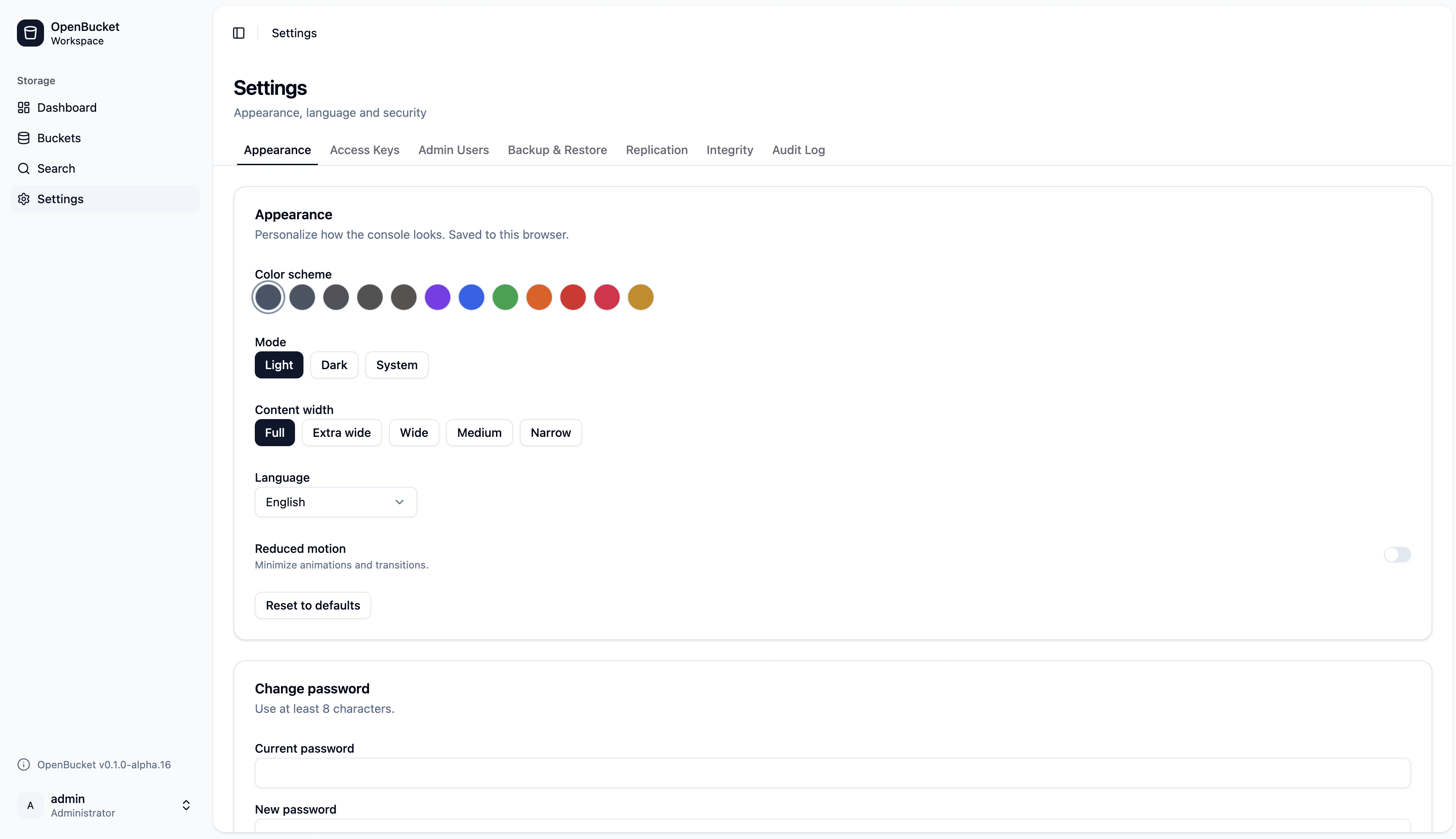
Settings (/settings) consolidates every instance-level admin area into one tabbed page. The active tab is driven by a ?tab= query param (e.g. ?tab=keys), so you can bookmark or link a specific tab.
Appearance
Theme (light / dark / system), a color scheme picker (slate, gray, zinc, neutral, stone, violet, blue, green, orange, red, rose, yellow), plus shell and tab-style variants and content width/alignment. Language toggles between English and German. This tab also hosts change password.
Access Keys
Create, inspect, rotate, and revoke access keys — including scoped sub-keys confined to a bucket/prefix. The new secret is shown once on creation. You also get an effective-permissions allow/deny view and a single-action simulate for scoped keys.
Admin Users
Manage multiple admin users, each either a full admin (every action) or read-only (can sign in and view everything, but is 403'd on any change). This tab is visible to full admins only. You can't delete or demote the last full admin, and you can't delete your own account.
Backup & Restore
Take whole-instance or per-bucket .zip snapshots on demand, or schedule them (cron/interval) with retention. Restore uploads an archive — and resets the target — so it asks for explicit confirmation.
Replication
Shows replication health — the pending / inflight / failed outbox depth and lag — and offers a Reconcile action that scans local objects, diffs them against the remote, and re-enqueues anything missing. No remote endpoint or credential is ever surfaced here.
Integrity
Surfaces the background integrity scrubber: scanned / ok / corrupt / repaired stat cards, a corrupt-object table, and a Scrub now button. A small red corrupt-count badge appears in the sidebar when anything is corrupt (hidden at zero).
Audit Log
A durable, queryable record of every state-changing admin action, newest first, keyset-paged with bounded retention.
A read-only admin can open every one of these tabs and read the data; the server default-denies any change by HTTP method, read fresh from the DB on each request, so a demotion takes effect immediately.
Next steps
- The openbucket CLI — the same buckets, keys, backup, and replication operations from the terminal.
- Observability — the Integrity and Replication numbers as Prometheus metrics.
- NestJS module reference — enabling the admin surface and serving the console.